

Brand workspaces
Every store you connect becomes its own brand workspace, with catalog, insights, and creatives kept cleanly apart.
The brand list
Your brands live in one list with a pipeline state per brand, whether newly connected, crawling, ready, or needing attention. Search the list, or hit Connect store to add the next one.
The state on each row is shorthand for where the brand sits in the loop. A brand still crawling is not ready to generate yet, a ready brand has a full catalog and insights, and a brand needing attention has a stage waiting on you, such as insights to review or a re-crawl to run.
Switching brands
The brand picker at the top of the sidebar switches the whole workspace. Products, variants, insights, and generation tools all scope to the selected brand. Nothing bleeds between brands, which is what makes agency work across many clients practical.
The brand hub
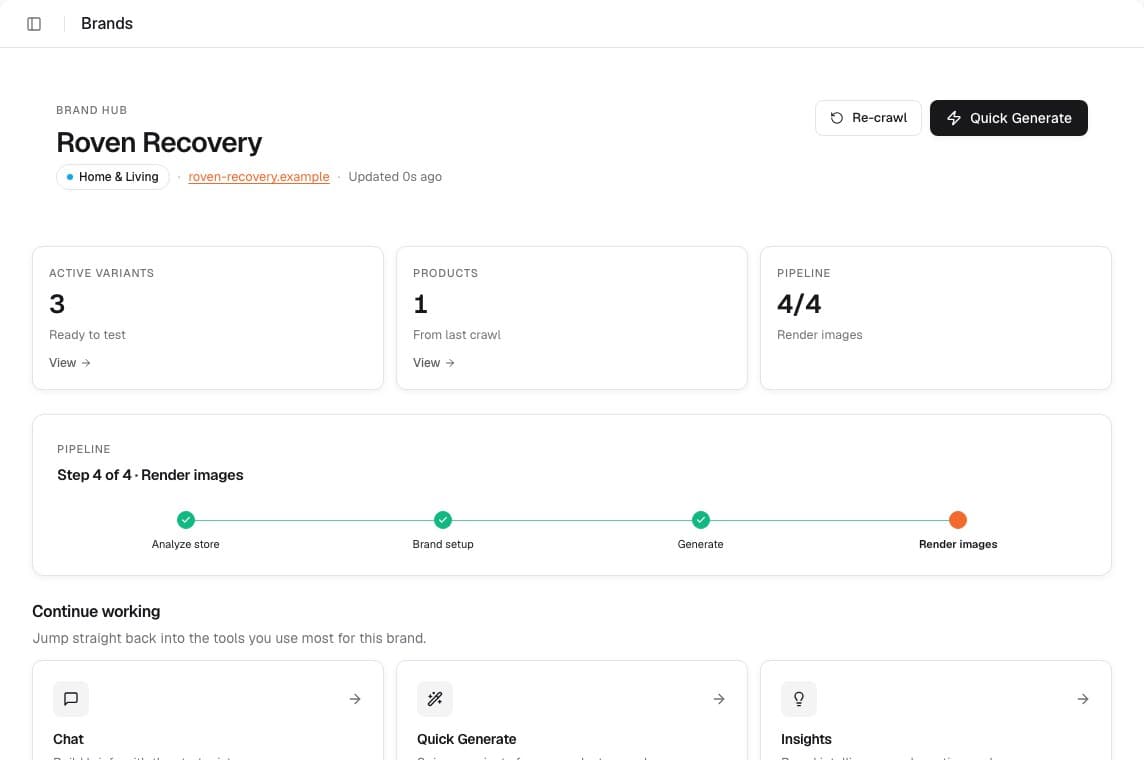
Each brand's hub shows the pipeline stepper (analyze store → brand setup → generate → render), live counts for variants and products, and continue-working tiles into Chat, Quick Generate, and Insights.
The pipeline stepper
The stepper names the four stages every brand moves through in order. Analyze store is the crawl and extraction that build the catalog. Brand setup is reviewing Brand Insights and, if you want, adding a Brand Kit. Generate is briefing and producing variants. Render is the final ad-ready images. The continue-working tiles drop you back at whichever stage is live, so you rarely have to hunt for the next step.
Keeping a brand fresh
Re-crawl from the hub after storefront changes, and VEKZT flags Brand Insights as stale when the catalog moves meaningfully. Refreshing insights after a re-crawl keeps every future brief working from current products and prices. Details in Connect a store.