

Quick Generate
Pick a product and a few concepts, and get a full batch of variants in one pass.
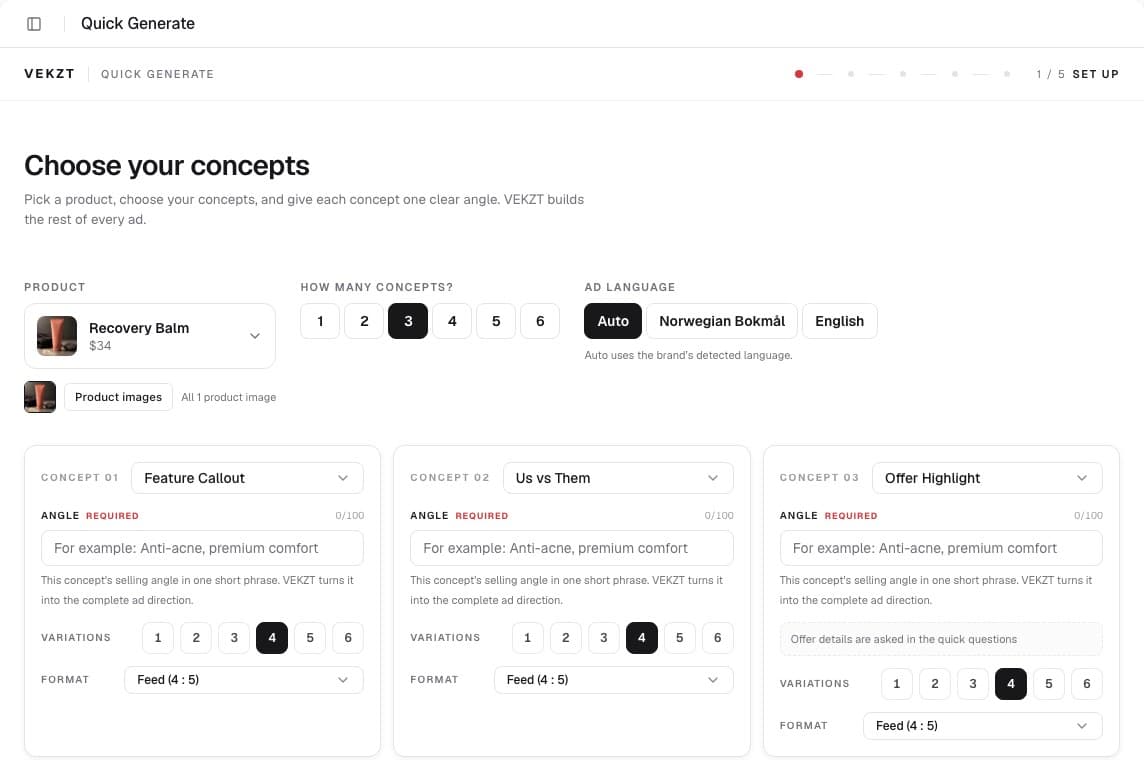
Quick Generate is the form-driven path to a diverse batch. When you know the shapes you want to test and would rather not talk it through, this is the fastest route from a product to a set of ready-to-test ads.
Choose your concepts
Pick a product, then choose one or more of the three proven ad concepts. Each one is a different way to sell the same product.
- Feature Callout, lead with a concrete product feature or benefit. Best when the audience does not yet know a differentiating feature.
- Us vs Them, position against the alternative. Good for crowded categories where buyers are actively comparing.
- Offer Highlight, put the offer or promotion front and center. Good for sale windows and retargeting.
Each concept can carry an optional angle to steer it further. Everything is still grounded in your Brand Insights, so the copy and look stay on brand.
Match the concept to awareness
A simple rule of thumb ties each concept to where your buyer is. Problem aware audiences respond to a Feature Callout, solution aware audiences to an Us vs Them, and product aware audiences to an Offer Highlight. The awareness levels in Brand Insights tell you which one your audience sits closest to.
Build the batch
- Pick a product and conceptsSelect the product, then one or more concepts, and add an optional angle to any of them.
- Set variations and formatChoose how many variations to generate per concept and pick the format, feed 4:5 or story 9:16.
- Review the total and runThe setup screen shows the total image count before you run, so there are no surprises on credits. Confirm to generate the whole batch in one pass.
After generation
Finished variants land in the Variants gallery, where you can filter, shortlist, and export.