

Quickstart
From a store URL to a batch of ad variants in about fifteen minutes.
Before you startAll you need is your store's URL. VEKZT works with Shopify, WooCommerce, and custom stores. Public signup is available at signup, and a new account starts with 15 Free credits once. Public account creation does not depend on paid billing; paid checkout availability is shown separately on Pricing.
The five steps
- Paste your store URLVEKZT discovers your product pages and shows a live count as it crawls. Confirm to create the brand and start the pipeline.
- Let the crawl finishCrawl → product extraction → Brand Insights run automatically. A typical store is ready in a few minutes, and the brand hub shows each stage of the pipeline.
- Open Brand InsightsReview what VEKZT learned about your voice, audience, and angles. Edit anything that looks off, since every generation builds on it.
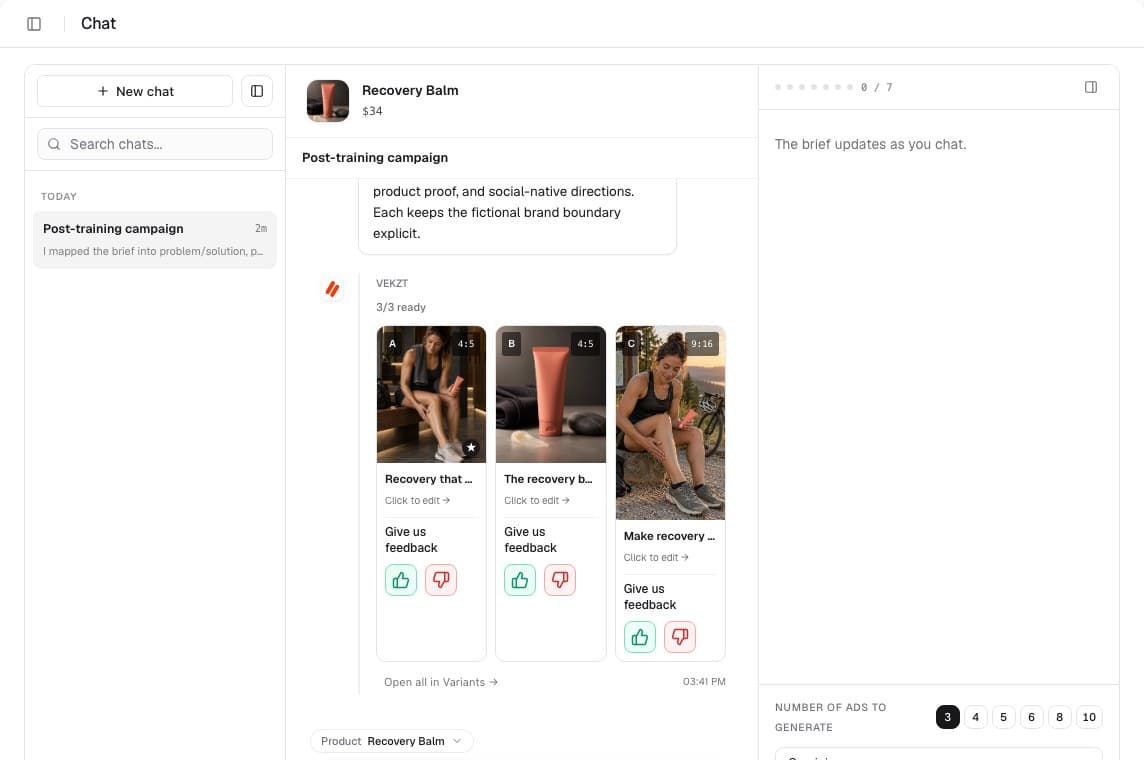
- Brief it in Chat, or run Quick GeneratePick a product and describe the campaign. VEKZT turns the conversation into a structured brief and renders a batch of variants.
- Review and exportOpen the Variants gallery, shortlist the winners, and export ad-ready PNGs in feed 4:5 and story 9:16.
How long it takesURL to first ready creative is typically 15 to 20 minutes on a store with 20 to 100 products. Most of that is the one time crawl, and later batches take a few minutes.
Tips for a strong first batch
- Start from the suggested angles in Brand Insights rather than a blank idea. VEKZT already picked the ones worth testing first.
- Keep the first batch small, around 2 to 3 concepts with a few variations each in one format. You can widen it once you see what lands.
- Fix anything off in Brand Insights before you generate, since every variant is conditioned on it.
- Pick one format to start so you compare like for like, then rerun the winners in the other format.
You do not have to wait on the screenEach variant shows its own status in the gallery, generating, ready, or failed, and the notification bell reports finished and failed jobs. You can leave and come back.
If the crawl finds no products
Point at the live storefrontConfirm the URL is your live, public storefront, then re-crawl. Password protected or staging stores cannot be crawled, and a normal store needs no keys, no app install, and no theme change.
Next steps
How VEKZT worksUnderstand the loop behind the five steps.Brief it in ChatGo deeper on the flagship brief-to-batch flow.
Quickstart FAQ
No. VEKZT is a web app. Paste your store URL and go.